Now on Elgato Marketplace

Professional monitor control for Stream Deck

Monitor Control gives studio engineers an undoubtedly flexible control surface for monitor management via Stream Deck. Built by a working Producer & Mastering Engineer, designed for modularity & efficiency.

Compatible with Trinnov Nova

$79.99 $99.99 Intro price
Monitor Control Pro running on a Stream Deck + XL — full monitor control surface with talkback, speaker sets, downmix, reference levels, SVG dials and LCD touchscreen

Sonic Control & Monitor Control are not affiliated with or endorsed by Trinnov. Trinnov and Nova are trademarks of their respective owner(s).

0
Button Actions
0
Dial Functions w/ Touchscreen Capability
0
Total Actions

Compatible with all Stream Deck models

See it in action

Capabilities

The controls you reach for most, on a Stream Deck

21 actions, 4 SVG dials, & LCD touchscreen functionality. Tap, hold, or twist. Countless interchangeable options, just an arm's length away. Real-time feedback illumination displays with active states. Check it out.

Bass Management button

Bass Management

Toggle bass-management routing on or off without interrupting playback.

Dim button

Dim

Instantly drop monitor output to a set dim level, with auto-restore.

Downmix Modes button

Downmix Modes

Cycle mono, stereo, swapped and Diff (L-R) to check your mix fast.

Headphones On/Off button

Headphones On/Off

Toggle the headphone output for a quick A/B against the room.

HP Vol Up/Down button

HP Vol Up/Down

Step headphone level up or down in fixed increments.

Input Source Select button

Input Source Select

Switch the active input source (1–11) with a single press.

Input Active (Hold) button

Input Active (Hold)

Hold to momentarily activate an input — ideal for talkback.

Level Set button showing 75 dBc

Level Set [dB / dBc]

Recall an exact monitoring level in either dB (0 to −48 dB) or dBc (56–90 dBc) — one button for each mode.

Mute Global button

Mute Global

Mute every monitor output at once for an instant kill.

Mute Outputs button

Mute Outputs

Mute individual outputs while leaving the rest live.

Optimizer Bypass button

Optimizer Bypass

Bypass acoustic optimization to hear the raw, uncorrected room.

Preset Recall button

Preset Recall

Recall a full saved monitor configuration in a single tap.

Solo Outputs button

Solo Outputs

Solo any output to focus your listening on one signal path.

Speaker Select button

Speaker Select

Switch speaker sets — far field, midfield, nearfield and more.

Vol Up/Down button

Vol Up/Down

Step master monitor volume up or down in fixed increments.

Vol Meter button showing 75 dB

Vol Meter [dB/dBc,HP]

Mains & Headphones level readout. Works in dB & dBc mode. HP shown in dB.

SVG Dials

Four touchscreen encoders — rotate and press
Master Vol dial

Master Vol Dial

Rotate to set master monitor level; press to mute output.

Reference Levels dB dial

Reference Levels [dB] Dial

Rotate for larger reference level swings in dB; press triggers dim.

Reference Levels dBc dial

Reference Levels [dBc] Dial

Rotate for larger reference level swings in dBc; press triggers dim.

Headphones Level dial

Headphones Level Dial

Rotate to adjust headphone volume; press to engage headphone amp.

Display

Press Actions & LCD Touchscreen

On Stream Deck + and Stream Deck + XL, Monitor Control renders live custom displays directly on the LCD touchscreen. Rotate the dial to adjust, or tap the LCD screen — both trigger the same action.

Monitor Control LCD touchscreen — Master Vol, Headphones, and Reference Level readouts active
LCD touchscreen — active state with live readouts
Monitor Control LCD touchscreen — dim engaged across outputs
LCD touchscreen — dim engaged
Monitor Control LCD touchscreen — mute and headphones off
LCD touchscreen — mute engaged
Free forever
Start Free

Try the essentials. For free.

Nine core functions to get you operating your Nova Monitor Controller.

And it's free.
Forever.

When you're ready, upgrade to Pro for the full 21-action suite. Free does include rotary dial action, dial press actions, and LCD touchscreen functionality.

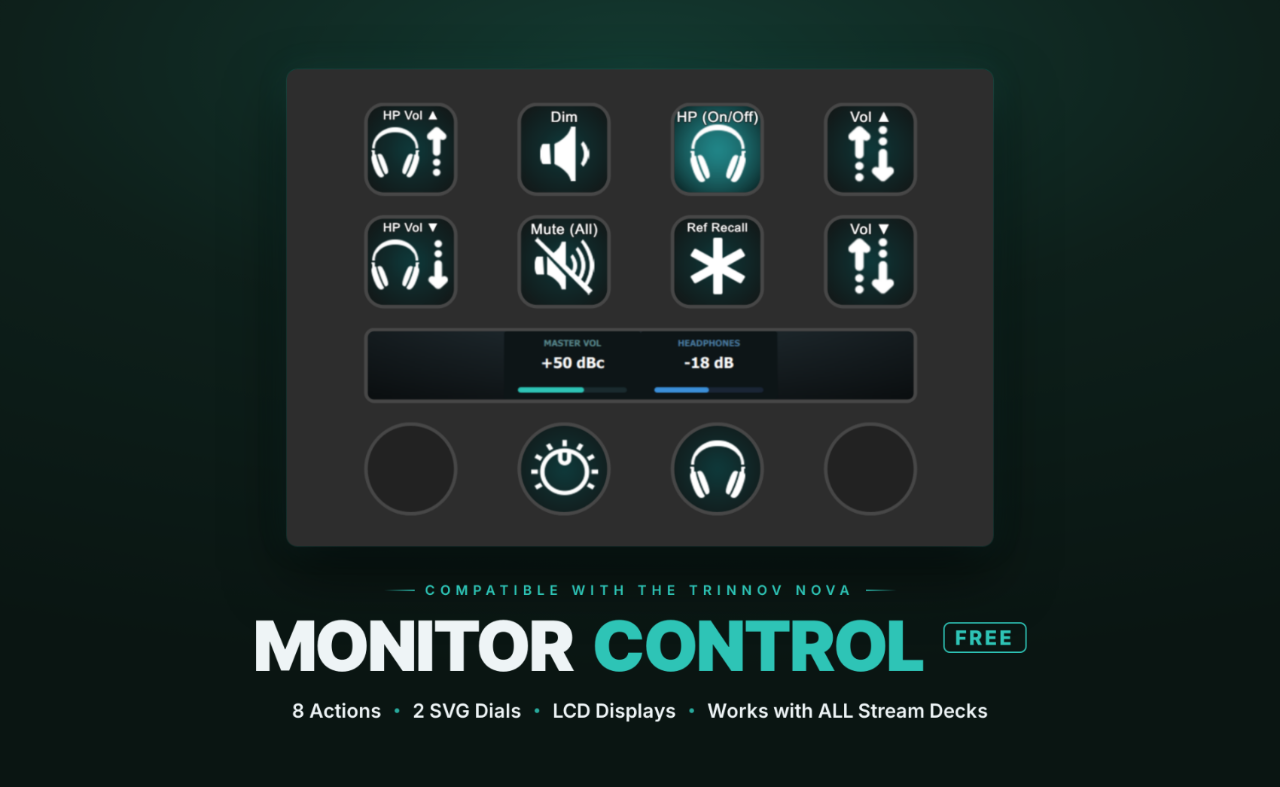
Monitor Control Free running on a Stream Deck — 8 actions, 2 SVG dials, LCD displays

Sonic Control & Monitor Control are not affiliated with or endorsed by Trinnov. Trinnov and Nova are trademarks of their respective owner(s).

Dim button

Dim

Instantly drop monitor output to a set dim level, with auto-restore.

Mute Global button

Mute (Global)

Mute every monitor output at once for an instant kill.

Headphones On/Off button

Headphones (On/Off)

Toggle the headphone output for a quick A/B against the room.

HP Vol Up/Down button

HP Vol (Up/Down)

Step headphone level up or down in fixed increments.

Vol Up/Down button

Vol (Up/Down)

Step master monitor volume up or down in fixed increments.

Vol Meter button

Vol Meter [dB/dBc,HP]

Mains & Headphones level readout. Works in dB & dBc mode. HP shown in dB.

Ref Recall button

Ref Recall

Recall your saved reference monitoring level in a single tap.

Free Dials

Two touchscreen encoders — rotate and press
Master Vol dial

Master Vol Dial

Rotate to set master monitor level; press to mute output.

Headphones Level dial

Headphones Level Dial

Rotate to adjust headphone volume; press to engage headphone amp.

Ready for the full surface?

Pro unlocks all 17 actions and 4 SVG dials — the complete 21-action monitor controller.

Upgrade to Pro
Built with Stream Deck Modularity in mind

Build the monitor controller you want

Your control, your layout, your surface — rearrange and reshape it the way you work.

  • Lives alongside your other tools within the Stream Deck ecosystem
  • Works with ALL Stream Deck models
  • LCD touchscreen support with SVG dials
  • Volume meter display (dB and dBc mode)
  • WebSocket connection — Real-time responsive control
  • Mac and Windows, Stream Deck 6.9+
  • Compatible with Trinnov Nova
Compatibility

Runs on any Stream Deck model

Monitor Control adapts from the compact Stream Deck Mini all the way to the Stream Deck + XL — featuring rotary dials with press actions and full LCD touchscreen functionality on Elgato's flagship hardware.

Monitor Control on a Stream Deck Mini
Stream Deck Mini
Monitor Control on a Stream Deck MK1/MK2
Stream Deck MK1/MK2
Monitor Control on a Stream Deck +
Stream Deck +
Monitor Control on a Stream Deck + XL
Stream Deck + XL
Pricing

Start free. Go pro when you're ready.

Available on the Elgato Marketplace

Free
$0
9 Core actions to get started. No time limit, no catch. Includes dials & LCD touchscreen functionality.
Download Free Now
SC

Monitor Control is built by Sonic Control Studios — an EDM producer and mastering engineer with 13+ years of experience in the studio. Built by someone who understands the need for workflow efficiency.