Now on Elgato Marketplace

Professional control for the RME ADI-2
All on Stream Deck

ADI Control gives audio engineers a dedicated hardware control surface for both the

RME ADI-2 Pro FS R

& RME ADI-2 DAC

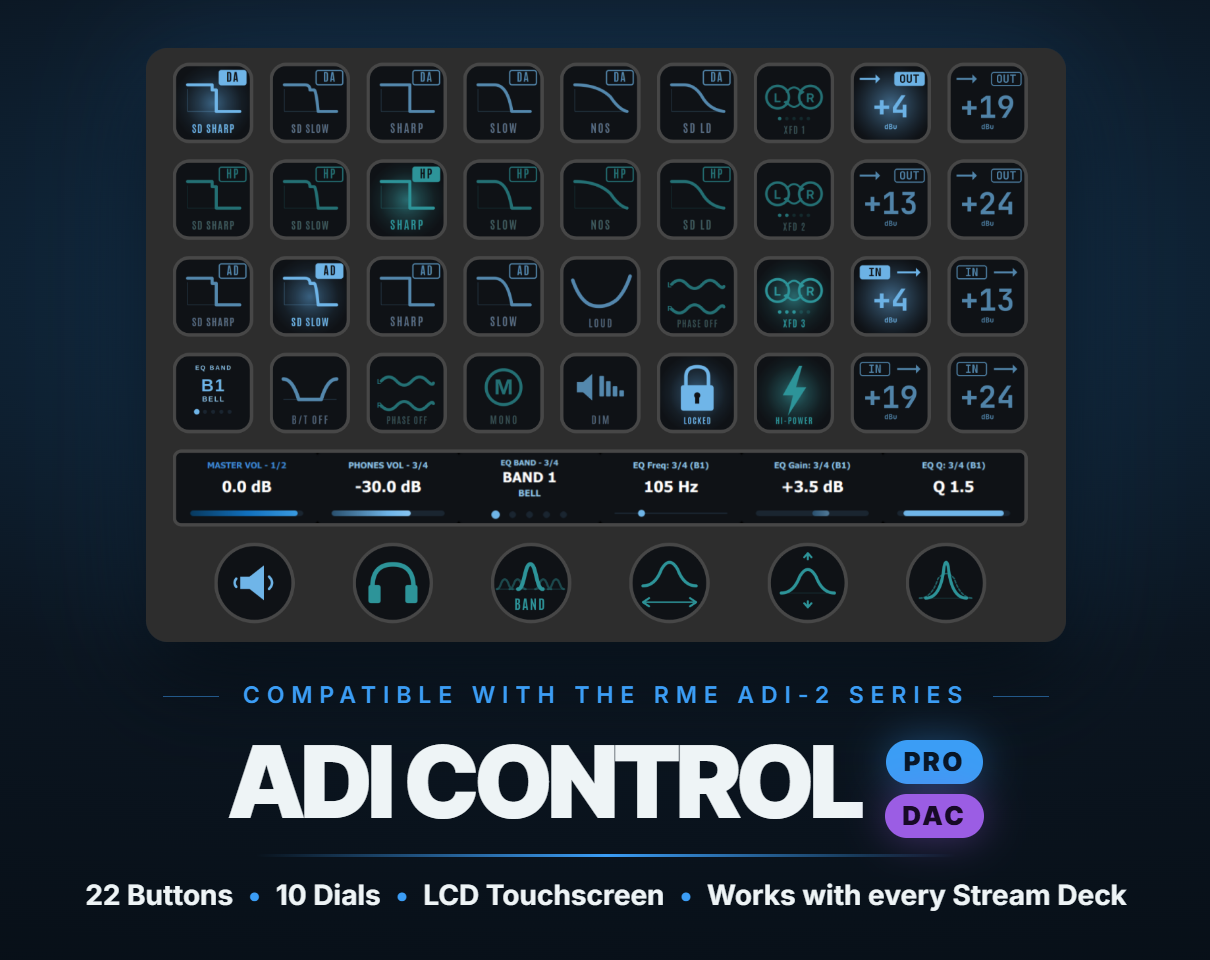
Live EQ'ing & Bass/Treble Control with dials, digital filter swapping on the fly, reference level hot-swaps, crossfeed control, main monitor controlling [mute, dim, mono, Mid/Side], and of course LCD Touchscreen Functionality

$69.99$99.99
Get ADI Control Pro
$59.99$79.99
Get ADI Control DAC
$0.00Forever
Try free version
Intro price — Pro & DAC
ADI Control Pro and DAC running on a Stream Deck + XL — AD/DA filters, crossfeed, reference levels, and EQ dials

Sonic Control & ADI Control are not affiliated with or endorsed by RME. RME and ADI-2 are trademarks of their respective owner(s).

0
Button Actions
0
Dial Functions w/ Touchscreen Capability
0
Total Actions

Compatible with all Stream Deck models

See it in action

Coming soon
November 2026

The full walkthrough lands with launch — EQ sweeps, filter swaps and live dials, all on the Stream Deck.

Capabilities

Whether you're an Audiophile, or a Professional Engineer, the Stream Deck gives you full control

21 button actions, 8 SVG dials, & full LCD touchscreen functionality. Tap, hold, or twist. Every parameter the ADI-2 exposes, at your fingertips. Real-time feedback illumination displays with active states.

Button Actions — 21 total

AD Filter button

AD Filter

Select the Analog-to-Digital filter type — Sharp, Slow, or SD.

Auto Ref Level button

Auto Ref Level

Toggle Automatic Reference Level for consistent output calibration.

Bass/Treble button

Bass/Treble

Toggle the Bass/Treble shelving EQ on or off.

Crossfeed button

Crossfeed

Toggle headphone crossfeed for more natural stereo blending.

DA Filter button

DA Filter

Select the Digital-to-Analog output filter — Sharp, Slow, SD, or NOS.

DA HP Filter button

DA HP Filter

Select the headphone output DA filter type independently.

Dim button

Dim

Drop output to a preset dim level without interrupting playback.

Dual EQ button

Dual EQ

Toggle independent EQ per channel for advanced L/R processing.

EQ Band Cycle button

EQ Band Cycle

Cycle through EQ bands 1–5 with each press — keep your hands on the dial.

EQ Enable button

EQ Enable

Toggle the parametric EQ on or off globally — bypasses all five bands.

EQ Preset Recall button

EQ Preset Recall

Recall a saved EQ preset instantly — no menu diving required.

Hi-Power button

Hi-Power

Toggle Hi-Power headphone amp mode for high-impedance cans.

Lock Volume button

Lock Volume

Toggle Volume Lock to prevent accidental level changes.

Loudness button

Loudness

Toggle the Loudness contour — compensates for lower listening levels.

Mono button

Mono

Toggle mono summing mode for checking mono compatibility.

M/S Processing button

M/S Processing

Toggle Mid/Side processing for advanced stereo control.

Mute button

Mute

Toggle output mute on or off — instant kill with a single press.

Phase Invert button

Phase Invert

Toggle phase inversion — Left, Right, or Both channels independently.

Ref Level In button

Ref Level In

Set analog input reference level — +4, +13, +19, or +24 dBu.

Ref Level Out button

Ref Level Out

Set analog output reference level — +4, +13, +19, or +24 dBu.

Vol Ctrl +/- button

Vol Ctrl +/–

Step master volume up or down in fixed increments.

SVG Dials

Eight touchscreen encoders — rotate and press · Stream Deck + and + XL
Main Volume dial
Stream Deck +

Main Volume

Rotate to adjust master volume continuously. Press to toggle mute.

Phones Volume dial
Stream Deck +

Phones Volume

Rotate to adjust headphone volume independently. Press to toggle headphone mute.

EQ Frequency dial
Stream Deck +

EQ Frequency

Rotate to sweep the active EQ band’s frequency. Press to reset frequency and cycle filter type on bands 1 & 5.

EQ Gain dial
Stream Deck +

EQ Gain

Rotate to adjust the active band’s gain (±12 dB). Press to reset to 0 dB.

EQ Q dial
Stream Deck +

EQ Q

Rotate to adjust bandwidth of the active EQ band (0.5–9.9). Press to reset Q. Display inverts — wide Q fills the bar.

B/T Frequency dial
Stream Deck +

B/T Frequency

Rotate to adjust Bass or Treble shelf frequency. Press to reset and switch between Bass and Treble bands.

B/T Gain dial
Stream Deck +

B/T Gain

Rotate to adjust Bass or Treble shelf gain (±12 dB). Press to reset gain and toggle B/T on or off.

B/T Q dial
Stream Deck +

B/T Q

Rotate to adjust Bass/Treble filter Q (0.5–1.5). Press to reset. Display inverts — wide Q fills the bar.

Display

Press Actions & LCD Touchscreen

On Stream Deck + and Stream Deck + XL, ADI Control renders live custom displays directly on the LCD touchscreen. Rotate the dial to adjust, or tap the LCD screen — both trigger the same action. Press actions and touchscreen functionality are included with each version, Free & Pro.

Bass/Treble controls on the Stream Deck + LCD touchscreen
Bass/Treble — gain, frequency and Q live on the touchscreen
Parametric EQ controls on the Stream Deck + LCD touchscreen
Parametric EQ — band select with frequency, gain and Q
IEM EQ controls on the Stream Deck + LCD touchscreen
DAC Edition — IEM volume alongside EQ band, frequency, gain and Q
Free forever
Start Free

Try the essentials. For free.

Seven core functions to get you operating your RME ADI-2.

And it's free.
Forever.

When you're ready, upgrade to Pro for the complete suite — full parametric EQ control, Bass/Treble dials, filters, reference levels, and every advanced function the ADI-2 exposes. Free does include rotary dial action, dial press actions, and LCD touchscreen functionality.

Ready for the full surface?

Pro unlocks 22 additional actions — all 21 button actions and 8 SVG dials, the complete 29-action ADI-2 controller.

Upgrade to Pro
Built with Stream Deck Modularity in mind

Build the ADI-2 controller you want

Your control, your layout, your surface — rearrange and reshape it the way you work.

  • Lives alongside your other tools within the Stream Deck ecosystem
  • Works with ALL Stream Deck models
  • LCD touchscreen support with 8 SVG dials
  • Real-time feedback — active states illuminate live from the device
  • USB MIDI connection — plug in, sync up, go
  • Mac and Windows, Stream Deck 6.9+
  • Echo suppression — no double-triggers when turning knobs on the unit
  • Compatible with RME ADI-2 Pro FS R & RME ADI-2 DAC
Compatibility

Runs on any Stream Deck model

ADI Control adapts to every Stream Deck — from the compact Mini to the MK1/MK2 and Neo, with rotary dials, press actions, and full LCD touchscreen functionality on Stream Deck + and + XL.

ADI Control on a Stream Deck Mini
Stream Deck Mini
ADI Control on a Stream Deck Neo
Stream Deck Neo
ADI Control on a Stream Deck MK1/MK2
Stream Deck MK1/MK2
ADI Control on a Stream Deck +
Stream Deck +
USB MIDI connection — ADI Control connects to the RME ADI-2 Pro FS R & RME ADI-2 DAC via USB MIDI. No additional software required beyond Stream Deck 6.9+.
Separate plugin
ADI Control (DAC Edition)

Built for the ADI-2 DAC and IEM listening

A dedicated build tuned to the ADI-2 DAC feature set — same control philosophy, same dials and press actions described above, with IEM-oriented output handling. Functions mirror those detailed in the Capabilities section; only the hardware target differs.

Button Actions — 14 IEM Specific

Bass/Treble
Bass/Treble
Crossfeed
Crossfeed
DA IEM Filter
DA IEM FilterDAC only
Dim
Dim
Dual EQ
Dual EQ
EQ Band Cycle (Button)
EQ Enable
EQ Enable
Lock Volume
Lock Volume
Loudness
Loudness
M/S Processing
M/S Processing
Mono
Mono
Mute
Mute
Phase Invert
Phase Invert
Vol Ctrl +/-
Vol Ctrl +/-

SVG Dials — 9 IEM Specific · Stream Deck + and + XL

B/T Frequency
B/T Frequency
B/T Gain
B/T Gain
B/T Q
B/T Q
EQ Band Cycle
EQ Band Cycle
EQ Frequency
EQ Frequency
EQ Gain
EQ Gain
EQ Q
EQ Q
IEM Volume
IEM VolumeDAC only

Example Profile — Stream Deck + with IEMs

ADI Control DAC Edition running on a Stream Deck + — IEM profile with crossfeed, EQ, and IEM volume dials
A working IEM layout — crossfeed, dim, single/dual EQ and M/S up top, live IEM Volume plus EQ Freq, Gain and Q on the dials.
ADI Control (DAC Edition) is a separate plugin — purpose-built for the RME ADI-2 DAC. Rotate, press, and LCD touchscreen behaviour matches the Pro build; see the Capabilities section above for how each function operates.
Pricing

Start free. Go pro when you're ready.

Available on the Elgato Marketplace

Coming November 2026
Intro price
DAC Edition
$59.99 $79.99
Separate plugin for the RME ADI-2 DAC — 20 button actions, 10 SVG dials, 30 total, with IEM-oriented output handling.
Get DAC — Elgato Marketplace
Free forever
Free
$0
7 core actions to get started. No time limit, no catch. Includes both volume dials with LCD touchscreen functionality.
Download Free Now
SC

ADI Control is built by Sonic Control Studios — an EDM producer and mastering engineer with 13+ years of experience in the studio. Built by someone who understands the need for workflow efficiency.